“Mom, can we have cloud hosting?”
“We have cloud hosting at home.”
The cloud hosting at home:
Self-Hosted K8s with K3s
The current state of this project is a two node cluster that exposes all services with a reverse proxy that is only accessible from the home network and another reverse proxy that has ingress controllers only to a few selected services. Some (but not all) of the services running on the cluster:
- Immich - all my photos migrated from Google Photos
- Jellyfin - movies and TV shows
- Projects - exposed through cloudflared tunnel
- Authelia - identity provider with OIDC and 2FA for publicly exposed services
- Forgejo - git hosting, docker registry, and CI/CD
The main users of these services are myself and my wife. The heaviest user, however, is my sister who will soon be using it from across the country to watch her favorite shows and movies. We’ll see how that goes.
Motivation/Purpose
From the very beginning, the aim for this project was to fill a hole in my skills. It was meant to be a fun learning project to practice orchestrating containers with Kubernetes, but it later evolved into an ongoing hobby to take ownership of my data and to deploy and manage my own services with self hosted CI/CD. Minimally, the short term goal was to expose Immich to be able to fully replace Google Photos. Any service I used should be reachable at a convenient domain name.
Hardware
To start, I only used two raspberry pi 4s. As of writing, I have since replaced them with two Thinkcentre Tiny PCs that are tucked away in the living room media cabinet.
- 2x Thinkcentre Tiny PCs
- 1x Raspberry Pi 4 as a Wireguard VPN gateway
- A network switch
- 2 external hard drives connected to the control node
I would love to have a dedicated NAS, but I’m not willing to pay today’s storage market prices.
Architecture and Networking
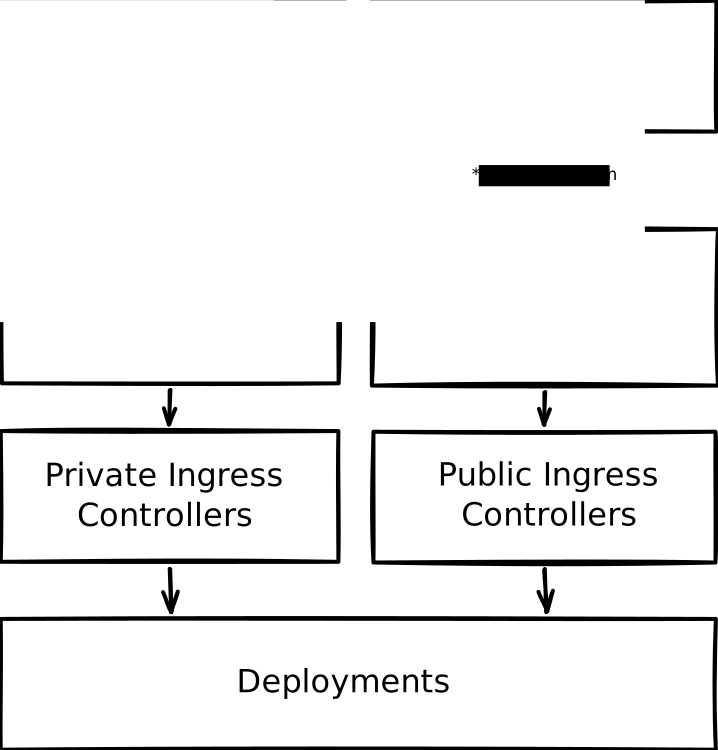
To achieve my most basic goals, I came up with the following architecture. The
entrypoints are two reverse proxies. A pihole DNS points all internal traffic
that is trying to reach my domain (let’s call it *.mydomain.com) to one
reverse proxy with ingress controllers for all apps. A second reverse proxy has
ingress controllers for a few select apps that I choose to expose. This second
public reverse proxy is what is listening on an open port. A public DNS record
points to my home IP where the public reverse proxy is listening.
Storage and Backups
Not illustrated in the diagram above:
- an NFS hosted on the control node.
- cloudflare tunnel to expose personal projects
Ideally, I would have liked to have a dedicated NAS for storage, but the cost of storage at today’s market prices is not something I am willing to pay at the moment. Instead, I have two external hard drives connected to the control node that are mounted to the NFS. The NFS is then mounted to all apps with their own persistent volume.
It would be irresponsible to not have a backup strategy if part of the intention is to migrate off of Google Photos. In order to make it as convenient as possible so as to not have to think about it, I have two cron jobs that run in the middle of the night. They are executed with restic to encrypt and push the data to a Backblaze B2 bucket. After about 5 months of usage, it has cost me less than a dollar to store all my photos and configs as well as running two restoration drills. Failed backups ping the UptimeKuma pod running in the cluster that then uses Ntfy to send notifications to my phone.
Alerts
Worth mentioning is that UptimeKuma and Ntfy are also running in the cluster. UptimeKuma monitors services running in the cluster by pinging them periodically. I will be notified on my phone if there is an alert. You could argue that it would be useless if the entire cluster is down, but at that point, the scream test would suffice for me.
Security
Security was a concern since opening ports was a requirement. Initially I opted
to simply expose Immich with Authelia as an
OIDC provider on
immich.mydomain.com. And while I wanted to naively trust Authelia to keep my data
secure, the multiple probing requests I would see in nginx logs made me feel
uneasy. Thankfully all those requests were aimed at my root domain, which was
configured to not respond at all rather than the default behavior of responding
with a 404.
Crowdsec quickly came up as the option to have the most seamless integration into a kubernetes cluster. The main downside, is that the Crowdsec remediation component (the piece that does that monitors and acts on a client’s request) is not compatible with nginx since nginx stopped supporting Lua. So the public reverse proxy was replaced with Traefik. Crowdsec then monitors Traefik logs and blocks IPs that the remediation component deems malicious based on crowdsourced lists of malicious IPs and the behavior of the requests. Within hours, the security engine caught probing requests and the IPs were blocked. Unfortunately, as of writing, I have not figured out how to configure Traefik to ignore requests that come to my root domain. Instead, I created a policy to block any IP that makes a request to a host that doesn’t exist such as the root domain.
CI/CD Pipelines
To support my personal projects and not have to worry about deployment to third party services and their costs, I deployed Forgejo to the cluster. It is a self hosted git hosting service. Alongside the git hosting, I deployed a CI runner that runs jobs like GitHub Actions.
I currently have the Wishvaults backend tested and deployed on Forgejo. I have a test action on commit and a deployment action on release. The deployment action builds the docker image and pushes it to the Forgejo registry, then deploys the new image to the cluster with kubectl.
Journey and AI Usage
I wasn’t unfamiliar with the ecosystem, so I had a general idea of what I needed and wanted. I used Claude to guide me through the initial setup that led me to what I have today. It allowed me to get moving quickly and to work along with it and the documentation from k3s, Kubernetes, and the deployments I wanted. After a couple of weeks of tinkering, I reached a point where I was able to catch hallucinations from the LLM and redirect it after verifying with documentation. As I continued to work on this project, I began to gain confidence to become increasingly less reliant on help from the LLM and instead go straight to the documentation.
Some Lessons Learned
NFS from localhost became an issue with high activity apps like Immich. One instance where I attempted to upload many large assets while canceling some uploads, created an NFS deadlock that slowly caused pods to start failing. The solution was to assign the Immich pod to prefer the node that was hosting the NFS, then point its persistent volume at the filesystem rather than at the NFS.
Adding a network switch wasted so much of my time when DNS suddenly started failing. The problem was that this new switch comes with the same IP address as the IP I assigned to the Pihole. Ultimately, the big tell was that when I read the device’s MAC address at the Pihole’s IP, it returned two different MAC addresses when probed from two different clients: a pod that could still talk to pihole and from my MacBook. Since it’s possible to look up the vendor by MAC address, I found that one of them was from Asus. The only Asus device in my network that I knew of was the new network switch. The quick solution was to change the Pihole’s IP address to avoid having to deal with managing one more piece of hardware.
A 14GB SD card was not enough for a Pi control plane. The SD card was so small because I acquired the Raspberry Pis from my wife who got them from work. With all the tinkering I was doing, the control node was building up enough images that were not getting cleared fast enough, causing pods not being able to start when pulling new images. To get around this, there were two instances where I had to ssh into the pi and clear all the junk it had accumulated. The plan was to remove the pi anyway, so I removed it and assigned the control plane to one of the Lenovos.
Future Plans
- Add a dedicated NAS for storage
- Incorporate FluxCD for real GitOps deployment
- Monitoring with Grafana and Loki
- Ephemeral PR preview environments for testing personal projects